> ## Documentation Index
> Fetch the complete documentation index at: https://docs.streamly.watch/llms.txt
> Use this file to discover all available pages before exploring further.
# Installation (from the ZIP)
> Unpack the CodeCanyon ZIP, set up Supabase, set env vars, run locally, sign in as operator, then deploy.
This is the install path for CodeCanyon buyers. Start here after you download the ZIP.
Online docs stay the source of truth: [docs.streamly.watch](https://docs.streamly.watch). The ZIP also includes `README-FIRST.txt` and `install-guide.txt` - read those first on disk, then follow this page.
**Time:** \~30–60 minutes for a first local run (plus DNS/TLS when you deploy).
## What you get after install
| Surface | URL |
| - | - |
| Viewer storefront | `https://your-domain.com` |
| Operator admin | `https://your-domain.com/admin` |
| Viewer login | `https://your-domain.com/login` |
| Plans / checkout | `https://your-domain.com/pricing` |
One deploy = **one streaming brand**. Payments, video CDNs, ads, analytics, and email are enabled later as [Plugins](/plugins/overview).
Streamly does **not** provide copyrighted media. You must have rights to every source you attach.
## Package contents
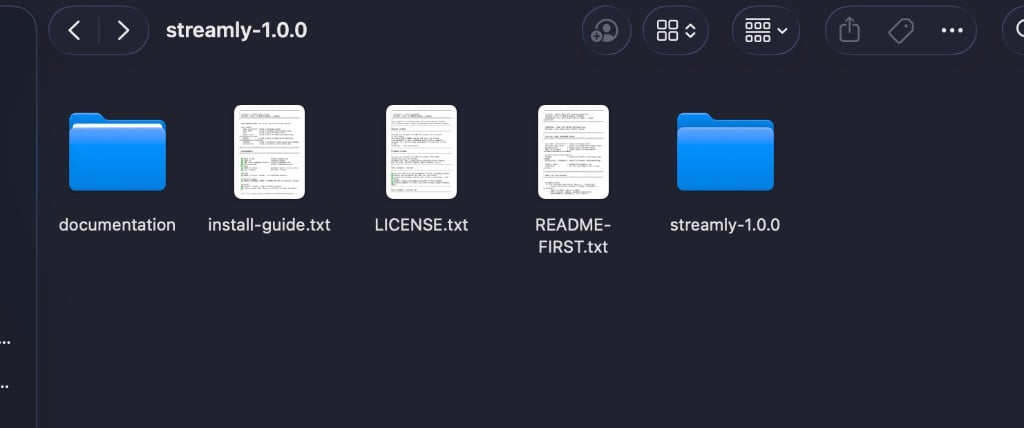
After you extract the CodeCanyon ZIP you should see:
```
streamly-1.0.1/ # Package root (ZIP)
├── documentation/ # Offline Mintlify docs + PDF
├── install-guide.txt # Short install checklist
├── LICENSE.txt # Envato Market license summary
├── README-FIRST.txt # Read this first
└── streamly/ # Application source - open terminal HERE
```
 | Item | Purpose |
| - | - |
| `README-FIRST.txt` | Requirements, links, unpack and first login |
| `install-guide.txt` | Condensed step list + troubleshooting |
| `documentation/` | Offline Mintlify docs (same UI as hosted) + PDF |
| `streamly/` | Next.js app (admin + storefront + APIs + migrations) |
Full tree: [Folder Structure](/technical/folder-structure).
## Requirements
| Need | Notes |
| - | - |
| Node.js **20+** | [nodejs.org](https://nodejs.org) |
| **pnpm 11** | `corepack enable` |
| Fresh **Supabase** project | Do not reuse old credentials |
| Operator **email + password** | Set as `STREAMLY_INITIAL_ADMIN_EMAIL` / `STREAMLY_INITIAL_ADMIN_PASSWORD` (16+ chars in production) |
| **TMDB** API token | Server-side metadata only |
| Hosting | Node 20+ / Docker / Vercel **or** Cloudflare Workers |
**First operator login also needs:**
| Secret | Why |
| - | - |
| `STREAMLY_INITIAL_ADMIN_EMAIL` | First operator - server-only, never `NEXT_PUBLIC_` |
| `STREAMLY_INITIAL_ADMIN_PASSWORD` | First operator password (≥ 16 characters in production). Removable after bootstrap |
Optional later: Stripe / PayPal, video plugins, ads, analytics. Details: [Requirements](/getting-started/requirements).
## Step 1 - Extract and open the app
1. Extract the ZIP.
2. Open **`streamly-1.0.1/streamly/`** in your editor (the app folder).
3. Open a terminal **inside that folder**.
You should see `package.json`, `.env.example`, `DEPLOYMENT.md`, `app/`, `supabase/migrations/`, `themes/`, `plugins/`, `addons/`.
## Step 2 - Install dependencies
```bash theme={null}
corepack enable
pnpm install --frozen-lockfile
```
## Step 3 - Create Supabase and run migrations
1. Create a **new** project at [supabase.com/dashboard](https://supabase.com/dashboard).
2. **Settings → API** - copy:
* Project URL → `NEXT_PUBLIC_SUPABASE_URL`
* `anon` `public` key → `NEXT_PUBLIC_SUPABASE_ANON_KEY`
* `service_role` key → `SUPABASE_SERVICE_ROLE_KEY`
3. **SQL Editor** - run every file in `supabase/migrations/` in **numeric / filename order**.
4. **Authentication → URL Configuration**:
* Site URL = your public URL (or `http://localhost:3000` locally)
* Add redirect URLs that include `/auth/callback`
There is **no** single `INSTALL.sql` / `schema.sql`. Use `supabase/migrations/` only.
Guide: [Supabase Configuration](/configuration/supabase).
## Step 4 - Environment variables
```bash theme={null}
cp .env.example .env.local
```
**Minimum:**
```bash theme={null}
NEXT_PUBLIC_APP_URL=http://localhost:3000
NEXT_PUBLIC_PLATFORM_HOST=localhost:3000
NEXT_PUBLIC_STREAMLY_API_BASE=http://localhost:3000/api/v1
NEXT_PUBLIC_SUPABASE_URL=https://YOUR_REF.supabase.co
NEXT_PUBLIC_SUPABASE_ANON_KEY=...
SUPABASE_SERVICE_ROLE_KEY=...
TENANT_SECRETS_MASTER_KEY="$(openssl rand -base64 32)"
STREAMLY_CRON_SECRET="$(openssl rand -base64 32)"
STREAMLY_INITIAL_ADMIN_EMAIL=you@example.com
STREAMLY_INITIAL_ADMIN_PASSWORD=at-least-16-chars
TMDB_API_TOKEN=...
```
**First operator bootstrap** (set on the host / Vercel / Wrangler secrets):
```bash theme={null}
STREAMLY_INITIAL_ADMIN_EMAIL=you@example.com
STREAMLY_INITIAL_ADMIN_PASSWORD=at-least-16-chars
```
These two values are **server-only**. Do not prefix them with `NEXT_PUBLIC_`. After the first operator signs in, you can remove `STREAMLY_INITIAL_ADMIN_PASSWORD` and redeploy.
Payment and analytics keys are usually pasted later in **Admin → Plugins** (encrypted) - not only in `.env`.
Full list: [Environment Variables](/technical/environment-variables).
## Step 5 - Run locally
```bash theme={null}
pnpm run dev
# or: pnpm run build && pnpm run start
```
Open:
| URL | Expect |
| - | - |
| `http://localhost:3000` | Storefront loads |
| `http://localhost:3000/admin/login` | Operator email + password |
| Item | Purpose |
| - | - |
| `README-FIRST.txt` | Requirements, links, unpack and first login |
| `install-guide.txt` | Condensed step list + troubleshooting |
| `documentation/` | Offline Mintlify docs (same UI as hosted) + PDF |
| `streamly/` | Next.js app (admin + storefront + APIs + migrations) |
Full tree: [Folder Structure](/technical/folder-structure).
## Requirements
| Need | Notes |
| - | - |
| Node.js **20+** | [nodejs.org](https://nodejs.org) |
| **pnpm 11** | `corepack enable` |
| Fresh **Supabase** project | Do not reuse old credentials |
| Operator **email + password** | Set as `STREAMLY_INITIAL_ADMIN_EMAIL` / `STREAMLY_INITIAL_ADMIN_PASSWORD` (16+ chars in production) |
| **TMDB** API token | Server-side metadata only |
| Hosting | Node 20+ / Docker / Vercel **or** Cloudflare Workers |
**First operator login also needs:**
| Secret | Why |
| - | - |
| `STREAMLY_INITIAL_ADMIN_EMAIL` | First operator - server-only, never `NEXT_PUBLIC_` |
| `STREAMLY_INITIAL_ADMIN_PASSWORD` | First operator password (≥ 16 characters in production). Removable after bootstrap |
Optional later: Stripe / PayPal, video plugins, ads, analytics. Details: [Requirements](/getting-started/requirements).
## Step 1 - Extract and open the app
1. Extract the ZIP.
2. Open **`streamly-1.0.1/streamly/`** in your editor (the app folder).
3. Open a terminal **inside that folder**.
You should see `package.json`, `.env.example`, `DEPLOYMENT.md`, `app/`, `supabase/migrations/`, `themes/`, `plugins/`, `addons/`.
## Step 2 - Install dependencies
```bash theme={null}
corepack enable
pnpm install --frozen-lockfile
```
## Step 3 - Create Supabase and run migrations
1. Create a **new** project at [supabase.com/dashboard](https://supabase.com/dashboard).
2. **Settings → API** - copy:
* Project URL → `NEXT_PUBLIC_SUPABASE_URL`
* `anon` `public` key → `NEXT_PUBLIC_SUPABASE_ANON_KEY`
* `service_role` key → `SUPABASE_SERVICE_ROLE_KEY`
3. **SQL Editor** - run every file in `supabase/migrations/` in **numeric / filename order**.
4. **Authentication → URL Configuration**:
* Site URL = your public URL (or `http://localhost:3000` locally)
* Add redirect URLs that include `/auth/callback`
There is **no** single `INSTALL.sql` / `schema.sql`. Use `supabase/migrations/` only.
Guide: [Supabase Configuration](/configuration/supabase).
## Step 4 - Environment variables
```bash theme={null}
cp .env.example .env.local
```
**Minimum:**
```bash theme={null}
NEXT_PUBLIC_APP_URL=http://localhost:3000
NEXT_PUBLIC_PLATFORM_HOST=localhost:3000
NEXT_PUBLIC_STREAMLY_API_BASE=http://localhost:3000/api/v1
NEXT_PUBLIC_SUPABASE_URL=https://YOUR_REF.supabase.co
NEXT_PUBLIC_SUPABASE_ANON_KEY=...
SUPABASE_SERVICE_ROLE_KEY=...
TENANT_SECRETS_MASTER_KEY="$(openssl rand -base64 32)"
STREAMLY_CRON_SECRET="$(openssl rand -base64 32)"
STREAMLY_INITIAL_ADMIN_EMAIL=you@example.com
STREAMLY_INITIAL_ADMIN_PASSWORD=at-least-16-chars
TMDB_API_TOKEN=...
```
**First operator bootstrap** (set on the host / Vercel / Wrangler secrets):
```bash theme={null}
STREAMLY_INITIAL_ADMIN_EMAIL=you@example.com
STREAMLY_INITIAL_ADMIN_PASSWORD=at-least-16-chars
```
These two values are **server-only**. Do not prefix them with `NEXT_PUBLIC_`. After the first operator signs in, you can remove `STREAMLY_INITIAL_ADMIN_PASSWORD` and redeploy.
Payment and analytics keys are usually pasted later in **Admin → Plugins** (encrypted) - not only in `.env`.
Full list: [Environment Variables](/technical/environment-variables).
## Step 5 - Run locally
```bash theme={null}
pnpm run dev
# or: pnpm run build && pnpm run start
```
Open:
| URL | Expect |
| - | - |
| `http://localhost:3000` | Storefront loads |
| `http://localhost:3000/admin/login` | Operator email + password |
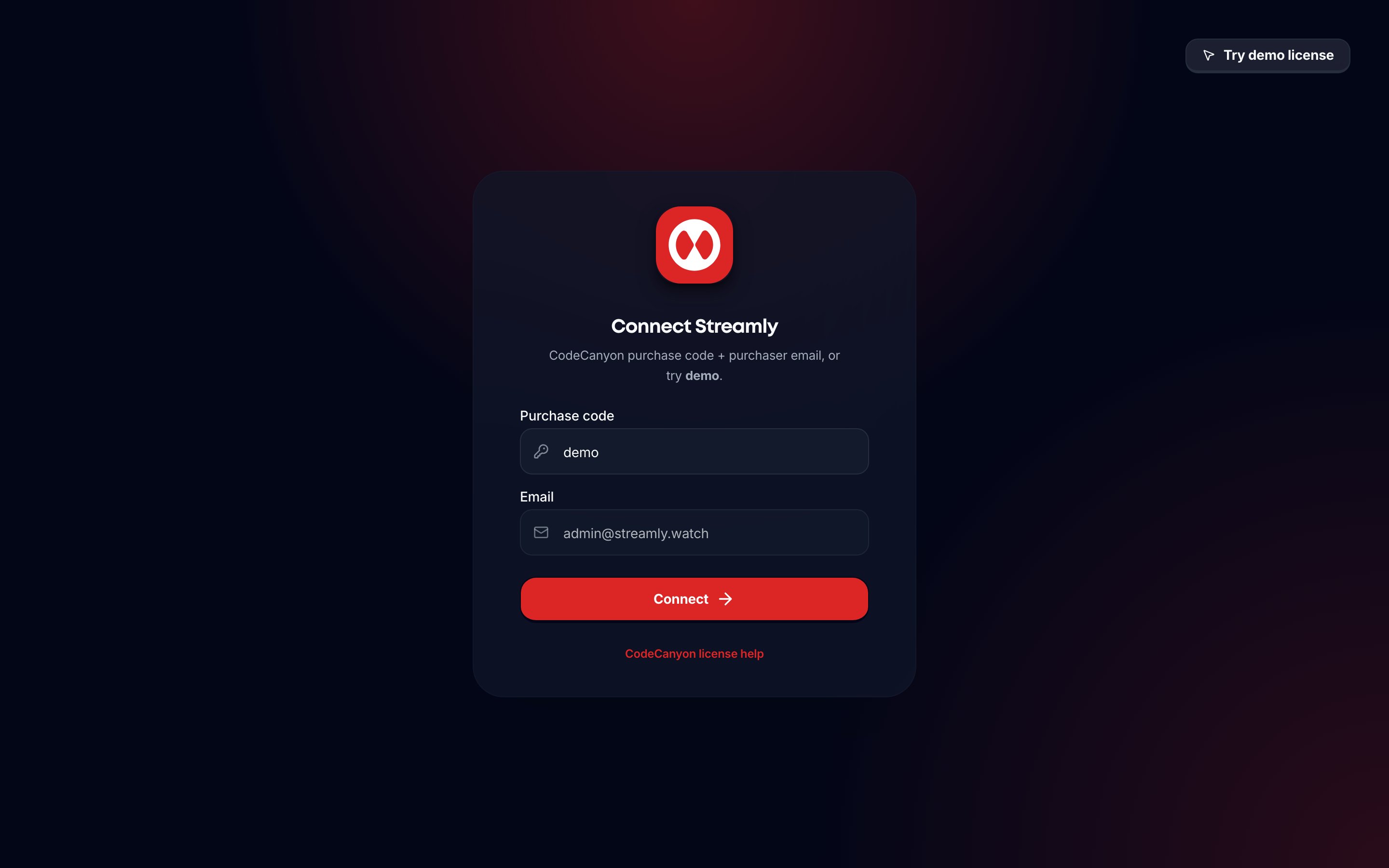 Compare with the live demo: [streamly.watch](https://streamly.watch).
## Step 6 - Sign in as operator
1. Open `/admin/login`.
2. Enter the **email and password**. On a new install these must match `STREAMLY_INITIAL_ADMIN_EMAIL` and `STREAMLY_INITIAL_ADMIN_PASSWORD`.
3. Finish onboarding → `/admin/overview`.
After the first operator exists, `/api/admin/login` only authenticates users already marked `is_operator=true`. Unknown emails cannot become operators. Public viewer signup never grants operator access.
## Step 7 - Deploy (when ready)
| Target | Guide |
| - | - |
| Node.js / reverse proxy | [Deploy (Node)](/getting-started/deploy-node) |
| Vercel | [Deploy (Vercel)](/getting-started/deploy-vercel) |
| Docker / OCI | Same page → Option B |
| Cloudflare Workers | [Deploy Cloudflare](/getting-started/deploy-cloudflare) |
Also see `DEPLOYMENT.md` inside the app folder.
After deploy, sign in on your **production** URL with the bootstrap operator credentials (or the existing operator password if you already completed first login).
## Step 8 - First product setup
| Task | Where |
| - | - |
| Apply a theme | `/admin/themes` |
| Logos, colors, SEO | `/admin/landing-page` |
| Plans | `/admin/plans` |
| Catalog + sources | `/admin/catalog` |
| Payments (optional) | `/admin/plugins` → Stripe / PayPal / Bank Transfer |
| Stripe webhook | `https://your-domain.com/api/webhooks/stripe` |
| PayPal webhook | `https://your-domain.com/api/webhooks/paypal` |
| Trial (optional) | Settings → Trial |
| Smoke test | Viewer signup → profile → play → checkout |
Bank-transfer viewers stay on Free until you **Approve** in `/admin/subscriptions`.
Full checklist: [First Launch Checklist](/getting-started/first-launch-checklist).
## Troubleshooting
| Symptom | Fix |
| - | - |
| “Operator login is not configured” | Set `STREAMLY_INITIAL_ADMIN_EMAIL` and `STREAMLY_INITIAL_ADMIN_PASSWORD` (16+ characters) and redeploy |
| “Invalid email or password” | First install: use the exact bootstrap credentials. After setup: use the operator’s Supabase password |
| “Password must be at least 16 characters” | Choose a longer password |
| Plans stay Free after Stripe | Confirm webhook + return URL - [Billing FAQ](/faq/billing-faq) |
| Bank transfer paid but Free | Approve in `/admin/subscriptions` |
| Catalog empty | Import titles / attach sources; check TMDB token |
| `/movies` redirects to login | Expected - catalog routes need viewer auth + profile |
More: [Deployment FAQ](/faq/deployment-faq), [General FAQ](/faq/general-faq).
## Related
* [Quick Start](/getting-started/quick-start) - shorter path once you know the package
* [Folder Structure](/technical/folder-structure)
* [Requirements](/getting-started/requirements)
* [Getting Support](/support/getting-support)
This documentation is built and hosted on [Mintlify](https://mintlify.com), a developer documentation platform.
Compare with the live demo: [streamly.watch](https://streamly.watch).
## Step 6 - Sign in as operator
1. Open `/admin/login`.
2. Enter the **email and password**. On a new install these must match `STREAMLY_INITIAL_ADMIN_EMAIL` and `STREAMLY_INITIAL_ADMIN_PASSWORD`.
3. Finish onboarding → `/admin/overview`.
After the first operator exists, `/api/admin/login` only authenticates users already marked `is_operator=true`. Unknown emails cannot become operators. Public viewer signup never grants operator access.
## Step 7 - Deploy (when ready)
| Target | Guide |
| - | - |
| Node.js / reverse proxy | [Deploy (Node)](/getting-started/deploy-node) |
| Vercel | [Deploy (Vercel)](/getting-started/deploy-vercel) |
| Docker / OCI | Same page → Option B |
| Cloudflare Workers | [Deploy Cloudflare](/getting-started/deploy-cloudflare) |
Also see `DEPLOYMENT.md` inside the app folder.
After deploy, sign in on your **production** URL with the bootstrap operator credentials (or the existing operator password if you already completed first login).
## Step 8 - First product setup
| Task | Where |
| - | - |
| Apply a theme | `/admin/themes` |
| Logos, colors, SEO | `/admin/landing-page` |
| Plans | `/admin/plans` |
| Catalog + sources | `/admin/catalog` |
| Payments (optional) | `/admin/plugins` → Stripe / PayPal / Bank Transfer |
| Stripe webhook | `https://your-domain.com/api/webhooks/stripe` |
| PayPal webhook | `https://your-domain.com/api/webhooks/paypal` |
| Trial (optional) | Settings → Trial |
| Smoke test | Viewer signup → profile → play → checkout |
Bank-transfer viewers stay on Free until you **Approve** in `/admin/subscriptions`.
Full checklist: [First Launch Checklist](/getting-started/first-launch-checklist).
## Troubleshooting
| Symptom | Fix |
| - | - |
| “Operator login is not configured” | Set `STREAMLY_INITIAL_ADMIN_EMAIL` and `STREAMLY_INITIAL_ADMIN_PASSWORD` (16+ characters) and redeploy |
| “Invalid email or password” | First install: use the exact bootstrap credentials. After setup: use the operator’s Supabase password |
| “Password must be at least 16 characters” | Choose a longer password |
| Plans stay Free after Stripe | Confirm webhook + return URL - [Billing FAQ](/faq/billing-faq) |
| Bank transfer paid but Free | Approve in `/admin/subscriptions` |
| Catalog empty | Import titles / attach sources; check TMDB token |
| `/movies` redirects to login | Expected - catalog routes need viewer auth + profile |
More: [Deployment FAQ](/faq/deployment-faq), [General FAQ](/faq/general-faq).
## Related
* [Quick Start](/getting-started/quick-start) - shorter path once you know the package
* [Folder Structure](/technical/folder-structure)
* [Requirements](/getting-started/requirements)
* [Getting Support](/support/getting-support)
This documentation is built and hosted on [Mintlify](https://mintlify.com), a developer documentation platform.