> ## Documentation Index
> Fetch the complete documentation index at: https://docs.streamly.watch/llms.txt
> Use this file to discover all available pages before exploring further.
# StreamTube Theme
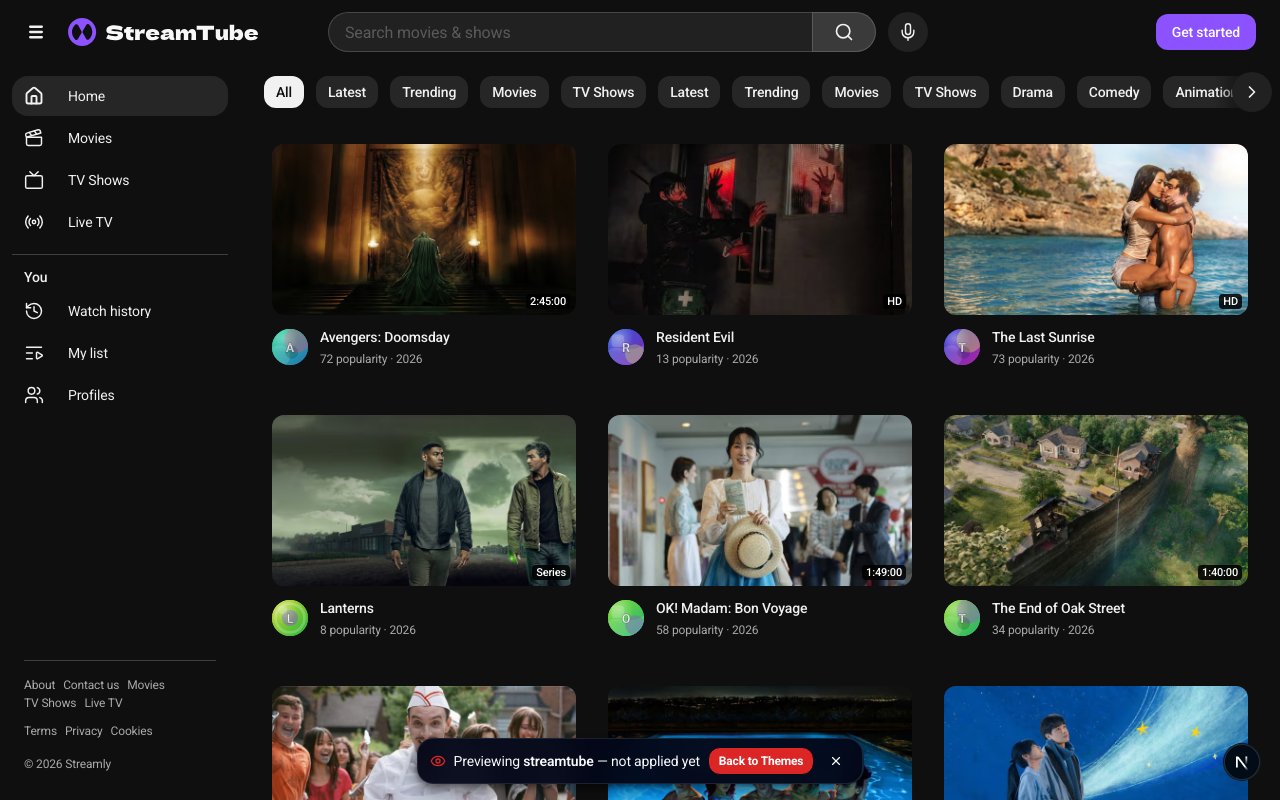
> Final discovery theme — guide/rail navigation, full-bleed gutters, soft 12px radius, flat CTAs.
**StreamTube** is a **Final** built-in theme package (`streamtube`, v1.0.0, category **Discovery**).
 ## At a glance
| | |
| - | - |
| **ID** | `streamtube` |
| **Status** | Final |
| **templateEntry** | `streamtube` |
| **Page shell** | Full-bleed guide gutters (`STOREFRONT_LIX_SHELL`) |
| **Chrome** | Flat buttons, soft \~12px radius (`sharp: false`) |
| **Capabilities** | Features section ✗ · Light mode ✓ |
| **Admin** | `/admin/themes` → Apply / Preview |
## What buyers get
* Desktop left **guide / rail**; mobile **drawer**
* Guide search including voice search where the browser allows
* Legal links live in the guide (no classic marketing footer)
* Discovery chrome for catalog + Live TV
## How to use
1. Open `/admin/themes`.
2. **Preview** with `/?__theme_preview=streamtube` (operator session) — does not persist.
3. Click **Apply** to make it live (snapshots previous theme look into presets).
4. Customize colors/logos/fonts in [Brand & Experience](/admin-dashboard/brand-experience) — edits save into `theme_presets[streamtube]`.
## Related
* [Themes Overview](/themes/overview)
* [Themes (Admin)](/admin-dashboard/themes)
* [Brand Presets](/viewer/brand-presets)
* [Themes & Skins](/viewer/themes-and-skins)
This documentation is built and hosted on [Mintlify](https://mintlify.com), a developer documentation platform.
## At a glance
| | |
| - | - |
| **ID** | `streamtube` |
| **Status** | Final |
| **templateEntry** | `streamtube` |
| **Page shell** | Full-bleed guide gutters (`STOREFRONT_LIX_SHELL`) |
| **Chrome** | Flat buttons, soft \~12px radius (`sharp: false`) |
| **Capabilities** | Features section ✗ · Light mode ✓ |
| **Admin** | `/admin/themes` → Apply / Preview |
## What buyers get
* Desktop left **guide / rail**; mobile **drawer**
* Guide search including voice search where the browser allows
* Legal links live in the guide (no classic marketing footer)
* Discovery chrome for catalog + Live TV
## How to use
1. Open `/admin/themes`.
2. **Preview** with `/?__theme_preview=streamtube` (operator session) — does not persist.
3. Click **Apply** to make it live (snapshots previous theme look into presets).
4. Customize colors/logos/fonts in [Brand & Experience](/admin-dashboard/brand-experience) — edits save into `theme_presets[streamtube]`.
## Related
* [Themes Overview](/themes/overview)
* [Themes (Admin)](/admin-dashboard/themes)
* [Brand Presets](/viewer/brand-presets)
* [Themes & Skins](/viewer/themes-and-skins)
This documentation is built and hosted on [Mintlify](https://mintlify.com), a developer documentation platform.